VILKUS-62 emulators are designed to disable DPF and SCR systems on various truck models and construction equipment, including Mack, Volvo, UD Trucks, Volvo CE, Prevost, and Volvo Penta.
VILKUS-62 Grey and VILKUS-62 Black are not only excellent plug&drive devices, but the VILKUS-62 Grey model also supports firmware updates via the Mochester App. This allows for convenient updates, ensuring your emulator remains compatible with the latest ECU versions and features.
⚠️ Important: VIN-lock warning! This device cannot be installed twice. Once connected to the truck/CE machine, it will never work with a different VIN. Please don’t use it for demo purposes!
Download Instructions
Use the links below to download PDF manuals detailing the correct installation process for VILKUS-62 Grey and VILKUS-62 Black DPF/SCR-off emulators.
Package Contents
- Emulator module: sealed plastic housing with a 62-pin connector, resistant to shock, water, dust, and electromagnetic interference.
Installation Guide
You will need:
- A laptop with Windows OS (Vista, 7, 8, 10, 11)
- An RP1210 diagnostic adapter
- The Mochester App installed
Follow the instructions provided by the engineer to complete the procedure.
VILKUS-62 Grey Installation
❗Note: If your truck/CE machine is already in derate mode at installation, contact Drunklab support team for recovery.
You can find the instructions for the proper installation of the VILKUS-62 Grey DPF/SCR-off emulator below. Carefully review the required sequence of actions presented in Figures 1 and 2.
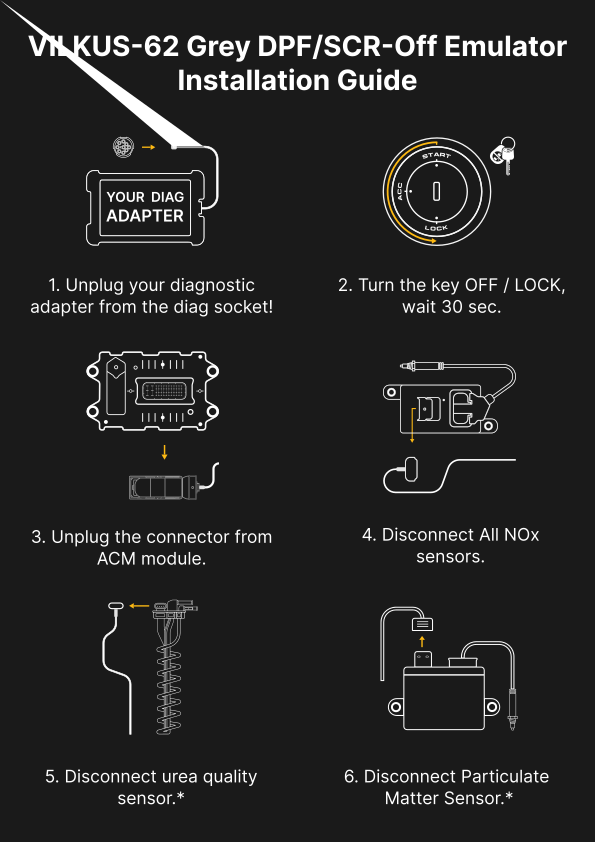
Figure 1.
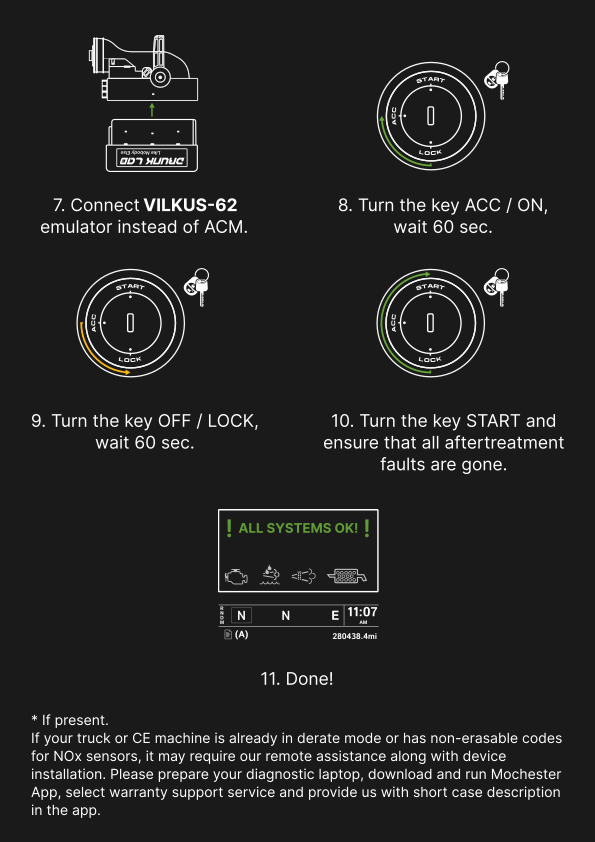
Figure 2.
VILKUS-62 Black Installation
❗Note: If your truck/CE machine is already in derate mode at installation, contact our support team for recovery.
⚠️ Important notice for US10 (2010-2013, 9-pin diag connector) trucks. Check for fault codes in MID128. If you see fault codes PSID90 or PSID46 (they are also in-erasable codes), DO NOT CONNECT THE VILKUS-62. Please connect the truck to the Mochester App using a compatible diagnostic adapter, select “Start connecting”. Then, after the truck has been successfully connected to the app, select “Claim a warranty” service and provide us with the error code you have read out and the serial number of the VILKUS-62 in the description of the claim.
You can find the instructions for the proper installation of the VILKUS-62 Black DPF/SCR-off emulator below. Carefully review the required sequence of actions presented in Figures 3 and 4.
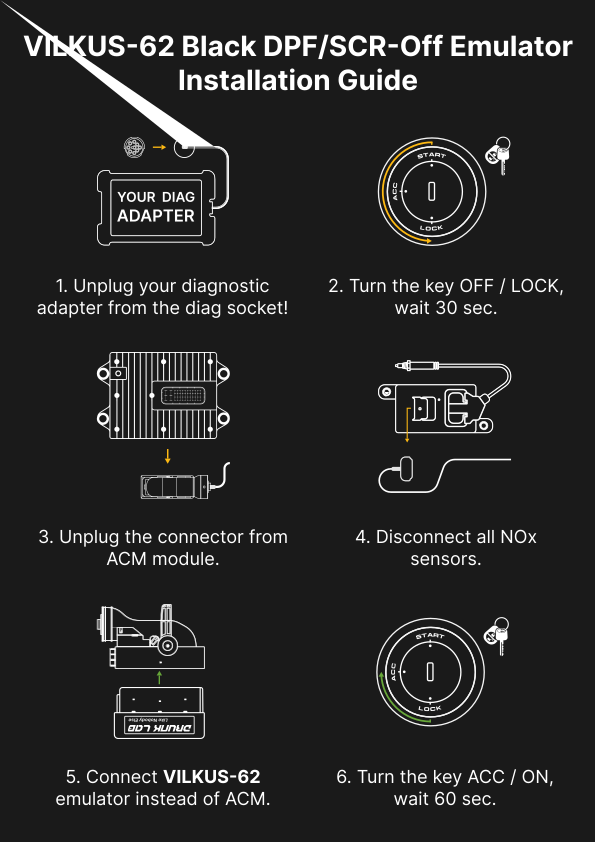
Figure 3.
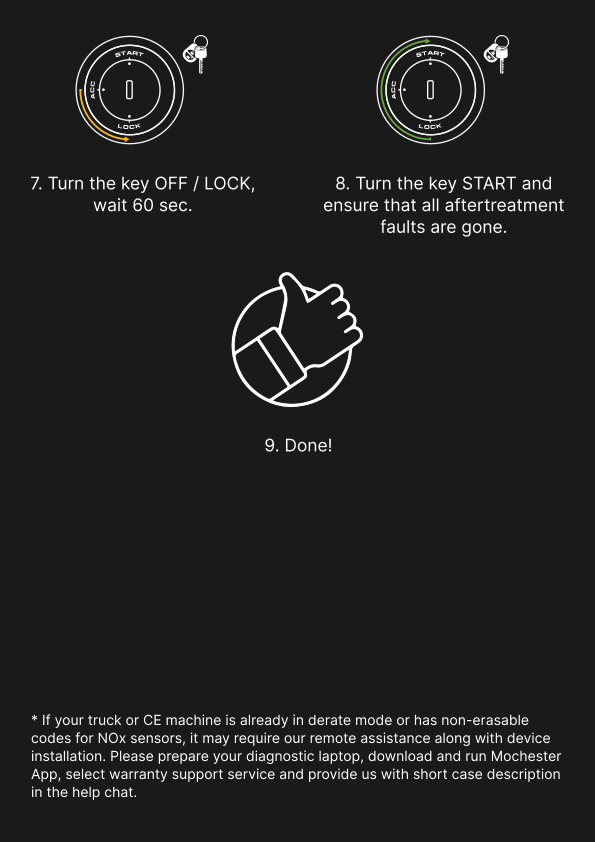
Figure 4.
Compatibility
VILKUS-62 Grey: DPF/SCR-off all-in-one emulator for Mack/Volvo trucks 2014+ (US14, US17, US21), Volvo CE (Construction Equipment) 2014+, and Volvo Penta. The result is DPF delete tuning, without the need to use a laptop and diag adapter!
VILKUS-62 Black: DPF/SCR-off solution for Volvo CE manufactured before 2014 and DPF/SCR-off solution for Volvo/Mack/Prevost US10 (2010-2013), UD Trucks US11/US12 (2010-2013).
Main Features
- No DPF/SCR-related fault codes
- No torque reduction under any operating conditions
- Permanently low soot levels
- Plug-n-Drop technology: quick and easy installation without soldering or crimping
- Advanced HCDEA™ and HCDMA™ algorithms for dynamic emulation and direct memory access
- Removable and reversible installation
- Firmware Update Capability: The VILKUS-62 Grey model supports firmware updates, which can be easily performed by connecting the device to the Mochester App. This allows for convenient updates, ensuring your emulator stays up-to-date with the latest functionalities
Warranty
VILKUS-62 DPF/SCR-off emulators are covered by warranty. For full details, please visit the official Drunklab warranty page.