Log in / Sign in
VILKUS-62 emulators are designed to disable DPF and SCR systems on various truck models and construction equipment, including Mack, Volvo, UD Trucks, Volvo CE, Prevost, and Volvo Penta.
VILKUS-62 Grey and VILKUS-62 Black are plug&drive devices. The VILKUS-62 Grey can update its firmware via the Mochester App. This means the device will always be able to run the latest version of its software and be compatible with the most recent ECUs.
⚠️ Important: VIN-lock warning! This device cannot be installed twice. Once connected to the truck/CE machine, it will never work with a different VIN. Please don’t use it for demo purposes!
Download Instructions
Use the links below to download PDF manuals detailing the correct installation process for VILKUS-62 Grey and VILKUS-62 Black DPF/SCR-off emulators.
Package Contents
- Emulator module: sealed plastic housing with a 62-pin connector, resistant to shock, water, dust, and electromagnetic interference.
Installation Guide
You will need:
- A laptop with Windows OS (Vista, 7, 8, 10, 11)
- An RP1210 diagnostic adapter
- The Mochester App installed
Follow the instructions provided by the engineer to complete the procedure.
VILKUS-62 Grey Installation
❗Note: If your truck/CE machine is already in derate mode at installation, contact Drunklab support team for recovery.
You can find the instructions for the proper installation of the VILKUS-62 Grey DPF/SCR-off emulator below. Carefully follow each step in the required sequence.
-
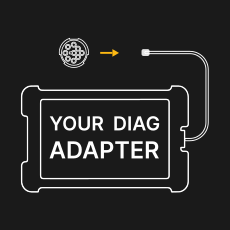
Unplug your diagnostic adapter from the diag socket!
-
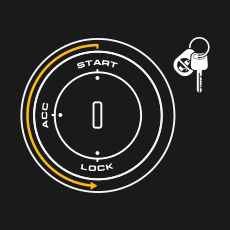
Turn the key OFF / LOCK, wait 30 sec.
-
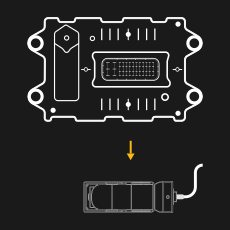
Unplug the connector from ACM module.
-
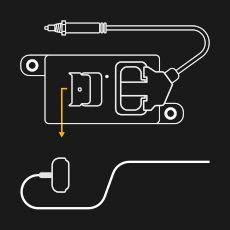
Disconnect All NOx sensors.
-
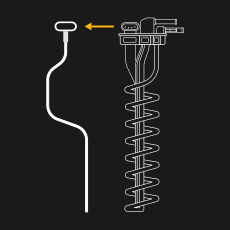
Disconnect urea quality sensor.*
-
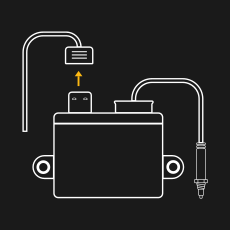
Disconnect Particulate Matter Sensor.*
-
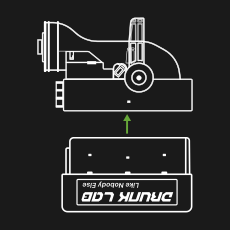
Connect VILKUS-62 emulator instead of ACM.
-
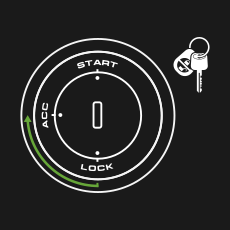
Turn the key ACC / ON, wait 60 sec.
-
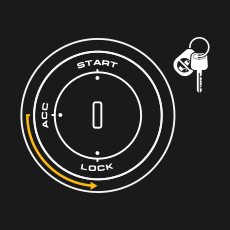
Turn the key OFF / LOCK, wait 60 sec.
-
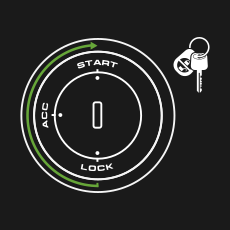
Turn the key START and ensure that all aftertreatment faults are gone.
-
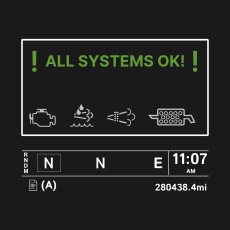
Installation successfully finished! DPF/SCR emulation active with zero faults on cluster display.
VILKUS-62 Black Installation
❗Note: If your truck/CE machine is already in derate mode at installation, contact our support team for recovery.
⚠️ Important notice for US10 (2010-2013, 9-pin diag connector) trucks. Check for fault codes in MID128. If you see fault codes PSID90 or PSID46 (they are also in-erasable codes), DO NOT CONNECT THE VILKUS-62. Please connect the truck to the Mochester App using a compatible diagnostic adapter, select “Start connecting”. Then, after the truck has been successfully connected to the app, select “Claim a warranty” service and provide us with the error code you have read out and the serial number of the VILKUS-62 in the description of the claim.
You can find the instructions for the proper installation of the VILKUS-62 Black DPF/SCR-off emulator below. Carefully follow each step in the required sequence.
-
Unplug your diagnostic adapter from the diag socket!
-
Turn the key OFF / LOCK, wait 30 sec.
-
Unplug the connector from ACM module.
-
Disconnect All NOx sensors.
-
Connect VILKUS-62 emulator instead of ACM.
-
Turn the key ACC / ON, wait 60 sec.
-
Turn the key OFF / LOCK, wait 60 sec.
-
Turn the key START and ensure that all aftertreatment faults are gone.
-

Done!
Compatibility
VILKUS-62 Grey: DPF/SCR-off all-in-one emulator for Mack/Volvo trucks 2014+ (US14, US17, US21), Volvo CE (Construction Equipment) 2014+, and Volvo Penta. The result is DPF delete tuning, without the need to use a laptop and diag adapter!
VILKUS-62 Black: DPF/SCR-off solution for Volvo CE manufactured before 2014 and DPF/SCR-off solution for Volvo/Mack/Prevost US10 (2010-2013), UD Trucks US11/US12 (2010-2013).
Main Features
- No DPF/SCR-related fault codes
- No torque reduction under any operating conditions
- Permanently low soot levels
- Plug-n-Drop technology: quick and easy installation without soldering or crimping
- Advanced HCDEA™ and HCDMA™ algorithms for dynamic emulation and direct memory access
- Removable and reversible installation
- Firmware Update Capability: The VILKUS-62 Grey model supports firmware updates, which can be easily performed by connecting the device to the Mochester App. This allows for convenient updates, ensuring your emulator stays up-to-date with the latest functionalities
Warranty
VILKUS-62 DPF/SCR-off emulators are covered by warranty. For full details, please visit the official Drunklab warranty page.