Log in / Sign in
A Guide to Checking Your Cummins Engine Compatibility for Tuning Solutions from DrunkLab
How can I check if my Cummins engine is compatible with tuning services from DrunkLab?
Finding your Cummins engine compatibility can be done in minutes using the Engine Serial Number (ESN). You first have to find the ESN for your engine, enter it on the Cummins official site to find your engine model and then find that model’s corresponding tuning service on DL.GE.
Introduction
For owners of trucks and pickups with Cummins engines, there is no doubt that the right tuning can boost power, improve throttle response, and increase fuel efficiency. But before ordering a service, there’s always one important question – is your engine compatible with a specific type of tuning or ECM modification?
The good news is that you don’t always have to contact technical support to find out. You can check if your Cummins engine is compatible within a few minutes by using the Engine Serial Number (ESN) and following some easy steps.
This guide will explain how to quickly locate your Cummins engine model, verify it on the official site, and select the appropriate tuning solutions in our official store.
Step 1: Identify the Engine Manufacturer
Verify that the truck has a Cummins with the engine identification label and/or the documentation. The truck brand alone does not identify the engine, and paint color is not a reliable way to tell.
If the engine has been replaced, use the identification details from the engine currently installed. The truck’s original build information may refer to a different engine.
Once you confirm that it’s a Cummins engine, the next step is the most important one: finding the Engine Serial Number (ESN).
Step 2: Where to Find the Engine Serial Number (ESN)
A Cummins ESN is eight digits long. Start with the labels you can reach easily before looking for a number stamped on the engine block.
Check the valve cover
On many Cummins engines, the easiest place to start is the data plate on the valve cover, also called the rocker cover. Look for the Engine Serial Number or ESN field and take a clear photo of the entire label.
Check the ECM label
The label on the Engine Control Module (ECM) is another useful source. Depending on the installation, it may be visible without removing the module or other components. It can include the ESN, the ECM part number, and calibration information.
The original ECM label and the Cummins record linked to its ESN can help identify the engine’s factory configuration, even if other components have been changed. If the ECM itself was replaced, compare its label with the engine data plate. Send both photos to support if the information does not match.
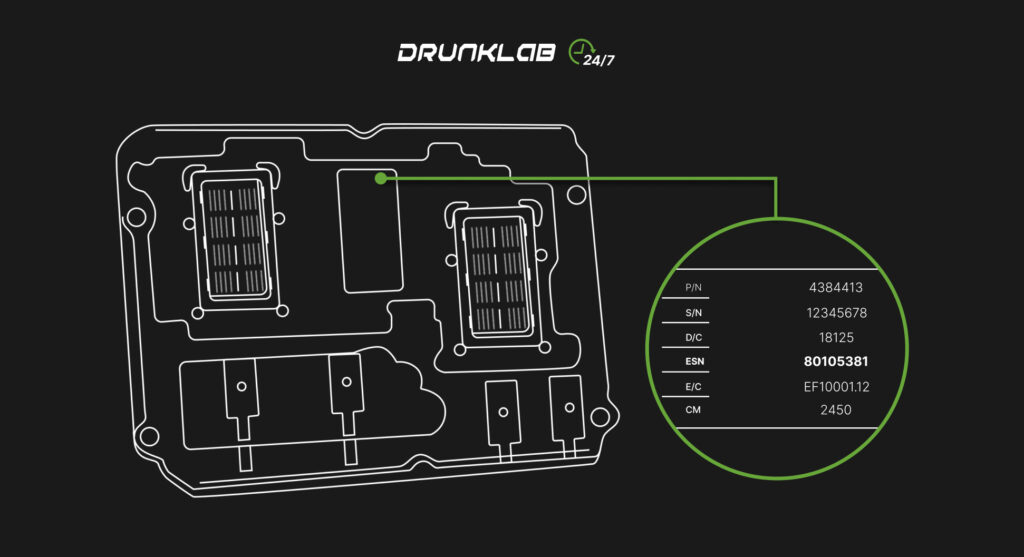
Engine Control Module (ECM)
IMPORTANT: Do not confuse the engine’s ESN with the ECM serial number.Other places to look
Label locations vary between engine families and versions, including ISM, QSM, ISX, ISC, and ISL. If the label is missing or unreadable, check the engine documentation or use the Engine Identification section of the appropriate Cummins manual to locate the number on the block.
Using the VIN
You can also search by the truck’s 17-character Vehicle Identification Number (VIN). When a Cummins engine was installed at the factory and the VIN is linked in the Cummins database, the lookup can return the engine’s information. This applies to factory-equipped trucks from brands such as Kenworth, Peterbilt, Volvo, and Mack.
If the VIN returns no result, use the ESN. If the engine was replaced, check the ESN of the installed engine rather than relying on the original VIN record.
Examples of possible data plate locations on Cummins engines are shown below.
IMPORTANT: Different Cummins engine models, the identification markings (ESN) can be located in different places — on the valve cover or on the ECM.
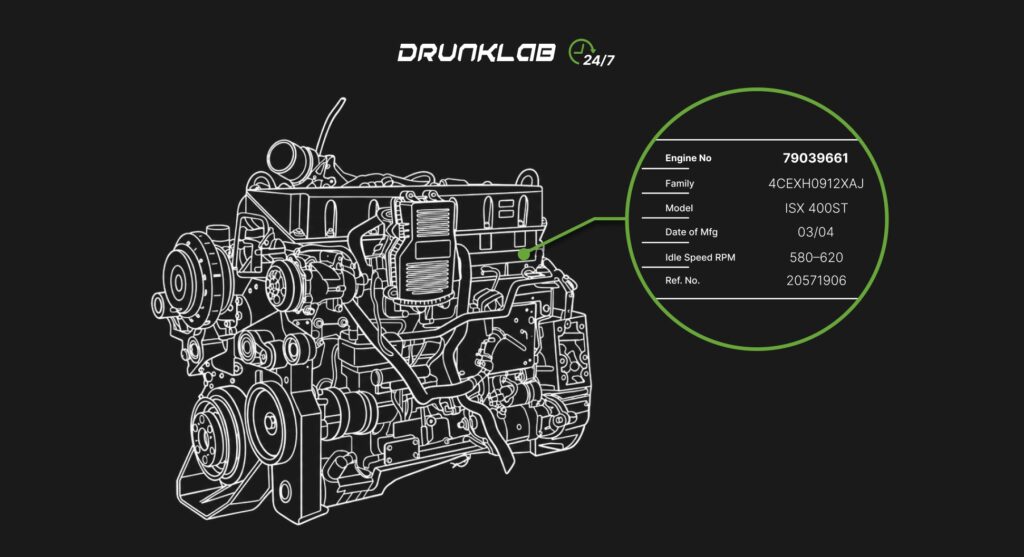
Cummins ISX
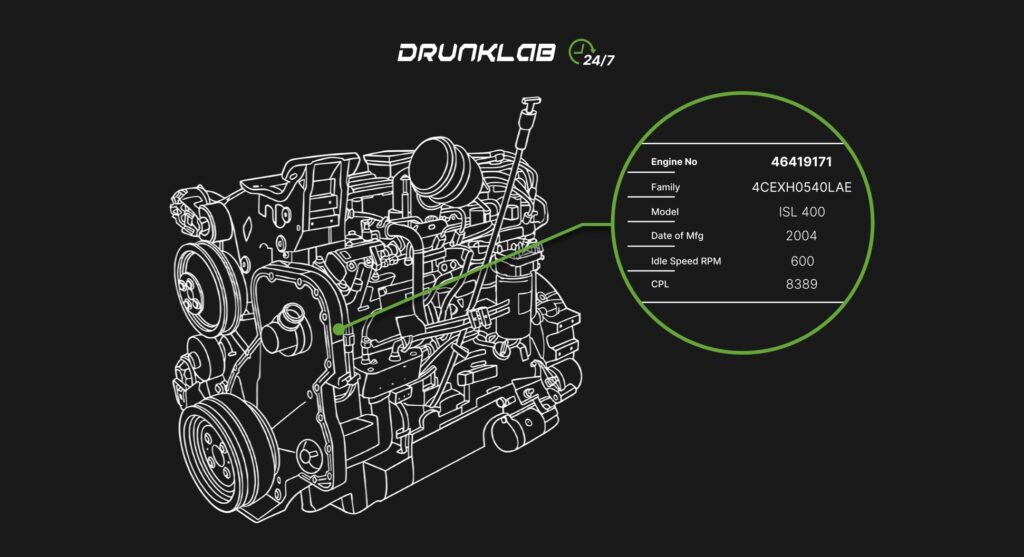
Cummins ISC/ISL
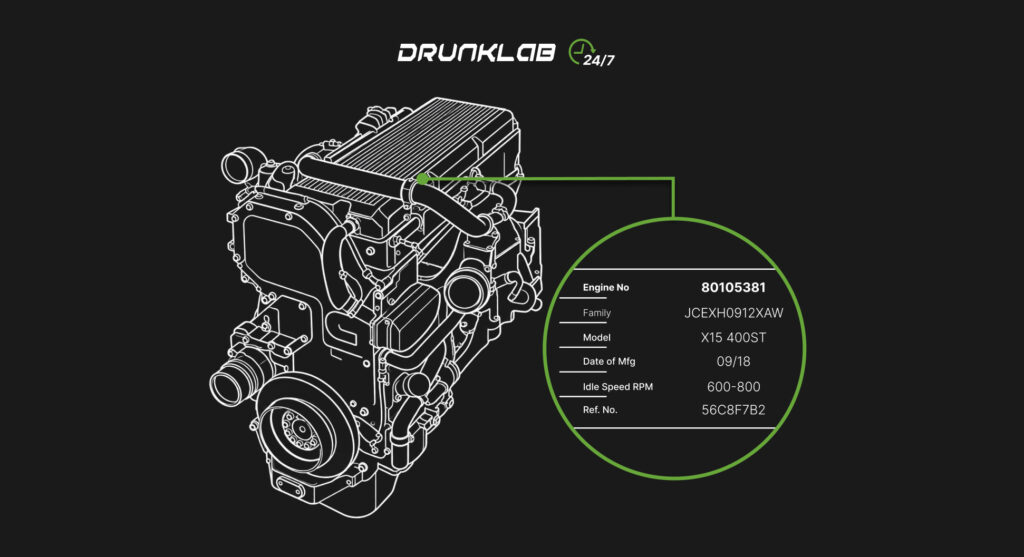
Cummins X15
Let’s use 80105381 as an example of an ESN.
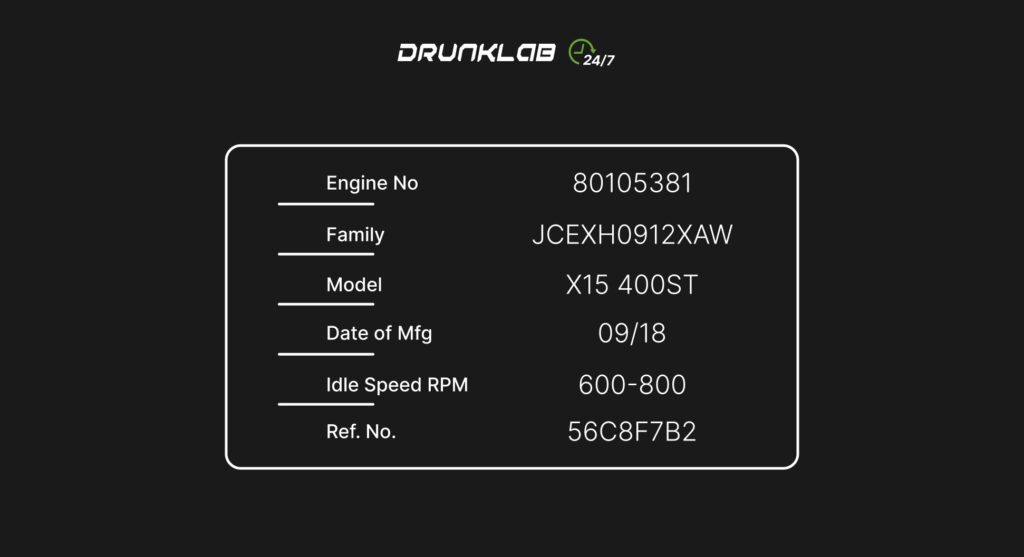
Engine Dataplate (example)
Advice: Take a photo of the data plate right away – it may be useful later.
Step 3: Check the Engine Data on the Cummins Website
Go to the official Cummins website: https://parts.cummins.com/
Then follow these steps:
3.1. Enter your ESN (for example, 80105381) in the search bar.
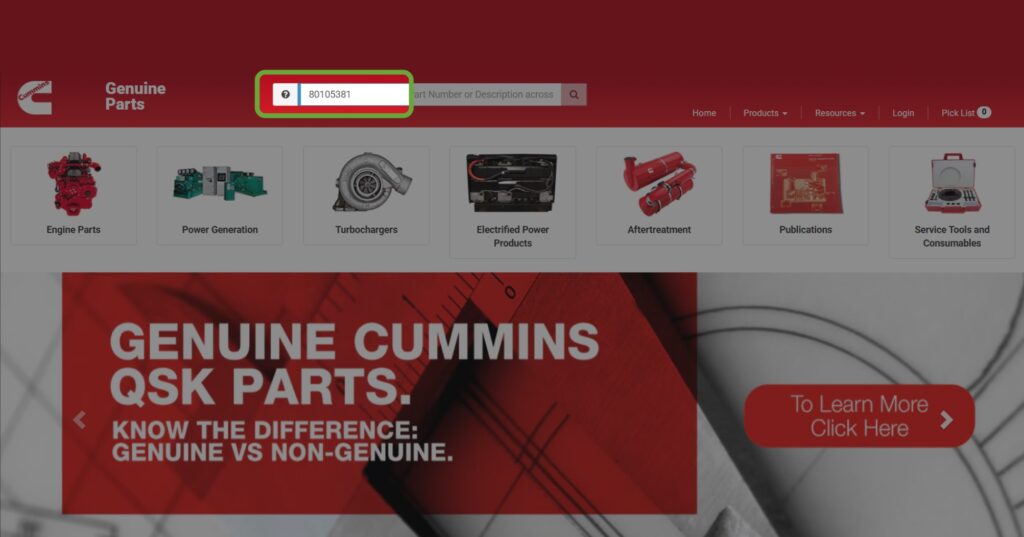
3.2. In the menu that appears on the left, select: Product Information → Engine Dataplate
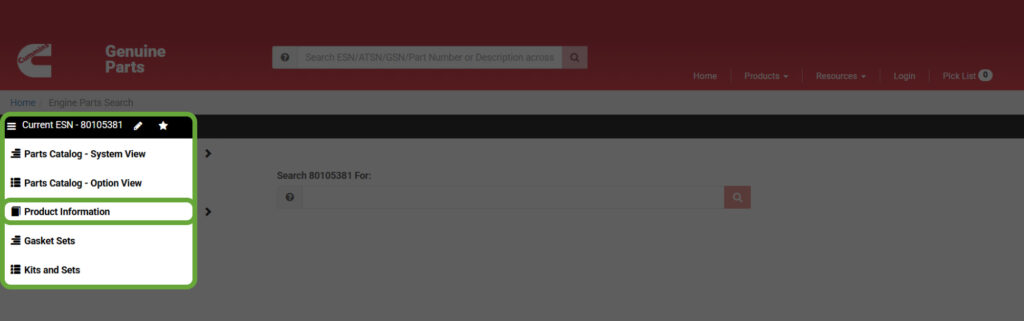
3.3. A table with engine information will appear. The field we are interested in is “Service Model Name”
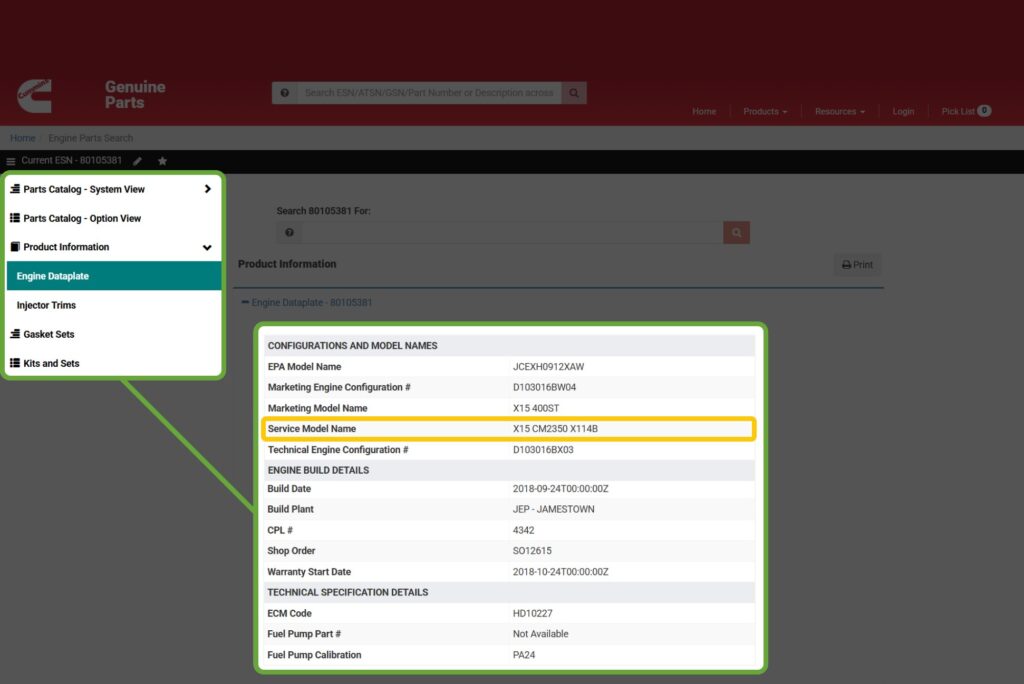
This field shows the Engine Series and Model (X15 CM2350 X114B). Once you identify the Service Model Name, you can identify the model Service required (e.g., X15).
Step 4: Finding the Service on the DL.GE Website
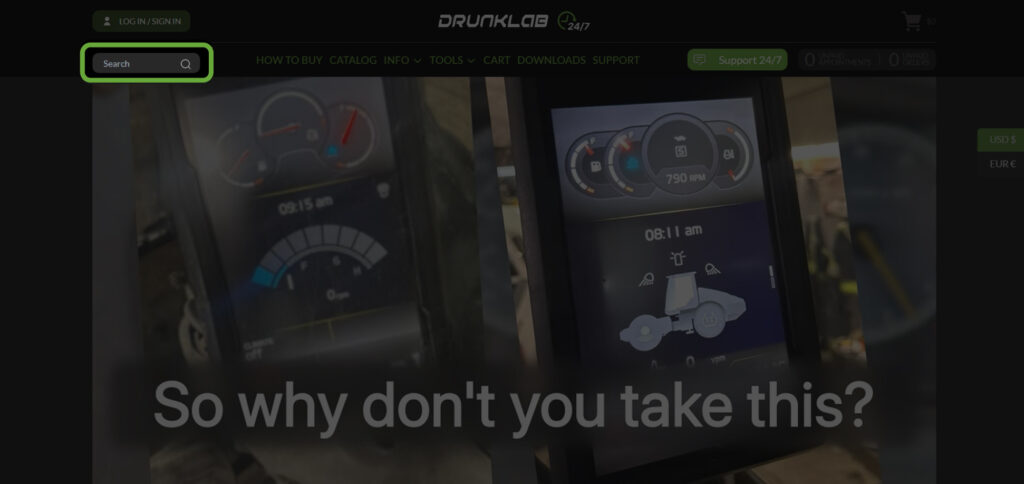
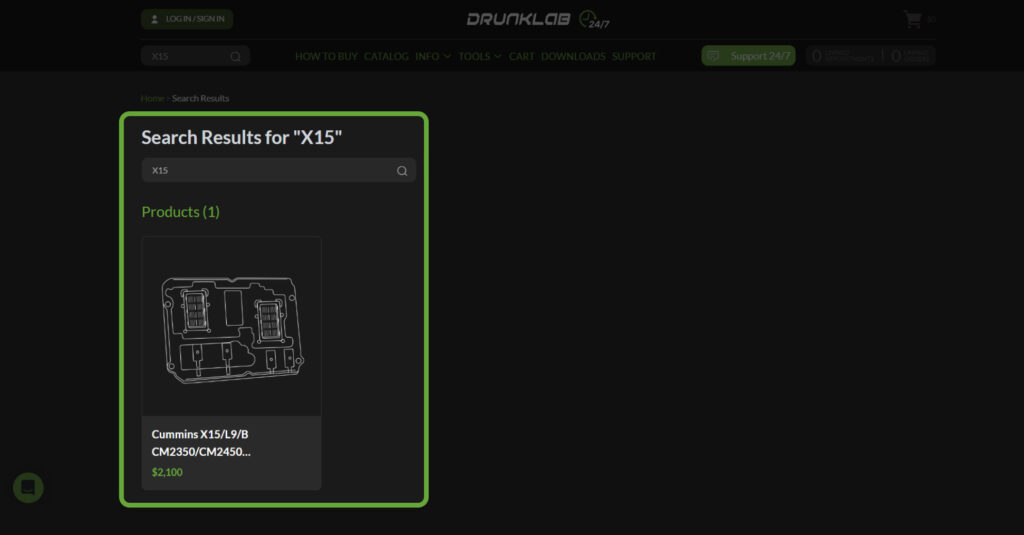
Visit DL.GE. You can type the name of your engine model in the search bar (in our instance, the example is X15), or the ECM model (in our instance, the example is CM2350).
Select and open the relevant tuning service from the search results. Read Applicability, Important Notice, and Equipment requirements. Confirm that the engine configuration matches and that the service covers the work you need.
An ECM designation alone is not enough. For example, CM2350 appears in services for both ISX and X15 engines. Compare the full Service Model Name with the service description before choosing.
Newer engines and locked ECMs
DrunkLab offers services for X15 and L9 engines, but availability depends on the installed ECM and whether it can be accessed for the requested programming.
Some newer trucks, including certain 2023, 2024, and 2025 models, have locked ECMs that we cannot program through this service. A newer model year does not guarantee support, and those years do not mean every truck is unsupported. Have us check your configuration before booking if there is any uncertainty.
Then follow these steps (we also have a video guide detailing this information):
- After logging in to your account, add the necessary amount to your wallet balance.
- Book a date and time for the service. The booking time is not strict as long as you connect during our working hours.
- Submit the VIN number or the ESN of your truck.
- Make sure you meet the service’s technical requirements. You will need:
- Laptop / PC / VM running Windows 7, 8, 10, or 11
- Communication adapter: Nexiq USB-Link, Noregon DLA, DPA, Inline, etc.
- TeamViewer (download the latest version from www.teamviewer.com)
- Fast and stable Internet connection (at least 50 Mb/s of UPLOAD and download speed). Check your speed here: www.speedtest.net
- Cummins Insite (activated for full functionality)
- Go to the cart and complete the payment.
After that, you will receive an email with an order confirmation and further instructions.
Note: If your Internet connection speed is at least 50 Mbps, having Cummins Insite software is optional.
Take Control of the Process
After checking the service and equipment requirements, sign in to your DL.GE account, make sure your wallet balance covers the service, and choose an available appointment. Enter the ESN or VIN that is requested, and follow the prompts to complete the booking.
Cummins programming sessions via TeamViewer are available Monday through Friday from 06:00 to 22:00 UTC. Connect at your scheduled time and follow the order confirmation instructions. TeamViewer sessions are not available on weekends.
These steps will give you a quick way to check if your Cummins engine can be tuned or if the emissions systems can be deleted. In most cases, the programming takes less than an hour.
Our support team is available 24/7 for any questions. Remote programming follows the TeamViewer schedule above.
FAQ
What is the difference between an ESN and a VIN
The ESN identifies the engine. The VIN identifies the truck. Both can be used for a Cummins lookup when the VIN is linked to the factory-installed engine. After an engine replacement, use the installed engine’s ESN.
Why does the page show ISL while Service Model Name says L9
The page can display a broader engine label as well as a specific service designation. Use the complete Service Model Name to select a service. If it identifies L9, check the L9 service and its ECM requirements.
Which newer Cummins engines are supported
Services are available for supported X15 and L9 configurations. The exact ECM and its access restrictions determine whether the requested work is possible. Contact us to check a newer truck with a potentially locked ECM.
Can I check the engine without diagnostic software
Yes. The website lookup uses the ESN or VIN and does not require INSITE. If you already have INSITE connected, its engine identification details can help support check the configuration.
What if the ESN or VIN returns no result
Recheck the characters and make sure you have entered the engine ESN rather than the ECM serial number. If a VIN search fails, try the ESN. You can also check the ESN through Cummins QuickServe Online or send clear label photos to DrunkLab support.
What should I send if I am unsure which service to order
Send the ESN or VIN, a screenshot showing the full Service Model Name, and clear photos of the engine and ECM labels. Include the truck’s make, model, and year, plus the service you need. Mention an engine or ECM replacement if you know about one. We can then check the details before you book.
The DrunkLab Team
Last updated: October 5, 2026