Effective date: 1-st of December, 2024
Truck drivers, bus operators, and construction equipment owners understand how critical reliability is under intensive usage. That’s why the DrunkLab Group (from now on referred to as DrunkLab) offers a limited lifetime warranty program, D3LW™, for its products: the RAZDOLBOSCH tuning adapter, the VLOMINGO tuning adapter, and the VILKUS-62 Black and the VILKUS-62 Grey SCR/DPF emulators.
This article will introduce you to the key terms and limitations of the warranty, as well as the warranty return procedures so that every customer knows what to expect.
Note: As of April 2022, discontinued devices, including the S-box, the T-box, the VILKUS-62 E6, and the VILKUS-62 CAT Edition, are covered by a two-year warranty service.
1. General Warranty Terms
1.1. Warranty Duration:
DrunkLab provides a D3LW™ limited lifetime warranty for the RAZDOLBOSCH, the VLOMINGO, and the VILKUS-62 Black and Grey devices with an “active” status. This warranty remains valid for the entire duration of the device’s use and includes replacement in case of malfunction.
1.2. Coverage Scope:
The warranty applies to the whole device and its components, regardless of which specific part fails, except in cases specified in Section 4.
2. Device Status Verification
2.1. Methods for Checking Device Status
Users can always verify the status of their device by following the link embedded in the QR code located on the device’s casing or by manually visiting https://dl.ge/checkist/ and entering the device’s serial number in the search bar.
2.1.1. “Active” Status:
A Warranty claim can only be submitted for devices having an “active” status. This means the device was purchased from the official DrunkLab Store and is not locked for security reasons.
In all other cases, the warranty will not apply.
2.1.2. “Stolen” Status:
A device is marked as “stolen” if lost during shipping or if the user obtains it through fraudulent schemes, including obtaining it without payment.
2.1.3. “Blocked” Status:
A device is marked as “blocked” whenever DrunkLab refuses further servicing for security reasons.
2.1.4. “Decommissioned” Status:
This status indicates that the device does not fall under any of the conditions outlined in sections 2.1.1, 2.1.2, or 2.1.3. The device verification page with PIN code authentication offers additional information pertaining to that device.
2.1.5. “Recalled” Status:
This status means that problems have been found in the device that may impact its functionality. Please contact our customer support team for detailed instructions on how to prevent any incidents.
3. Warranty Obligations
3.1. Covered Warranty Cases:
The warranty covers any cases of complete or partial device failure, including:
3.1.1. Malfunctions that occur during device operation, including functional failures or performance degradation.
3.1.2. Complete device failure, where it entirely loses the ability to perform its functions.
3.1.3. Software obsolescence that leads to operational issues or communication problems with the vehicle.
3.2. Device Replacement:
The D3LW™ program facilitates device replacement only. Customers receive their devices back without unnecessary delays and warranty repair services are not provided.
3.3. Installation and Configuration Services:
It is important to note that the warranty does not cover installation or configuration services. These must be performed independently or with the help of professionals at an additional cost.
3.4. Other Warranty-Related Expenses:
While the warranty covers the entire device, it is not insurance against potential consequences of device malfunctions. In particular, DrunkLab will not reimburse costs associated with return shipping. However, the policy of free shipping from DrunkLab to the user remains in effect.
4. Limitations and Exclusions
4.1. Environmental Conditions That Void the Warranty:
The warranty will no longer be valid under the following conditions:
4.1.1. Mechanical damage to the device or its connectors. Damage due to a physical impact (see Figure 1).
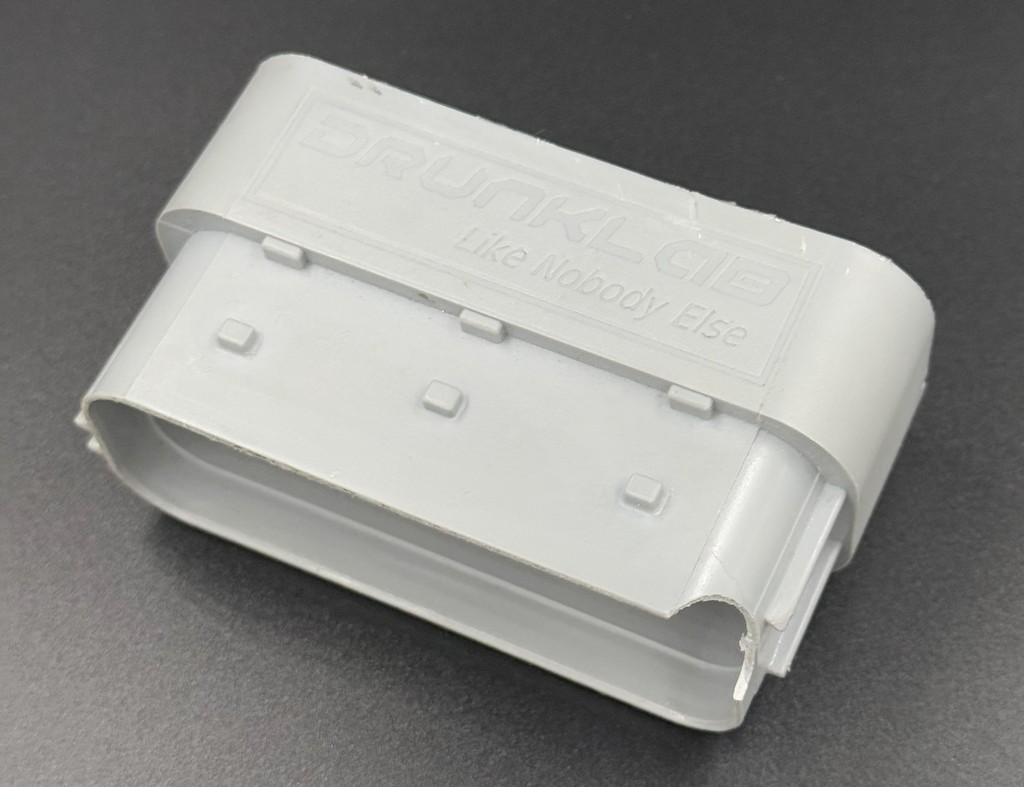
(Figure 1)
4.1.2. Improper connection and installation. The device is installed on an incompatible vehicle or misconnected in other ways (see Figure 2).
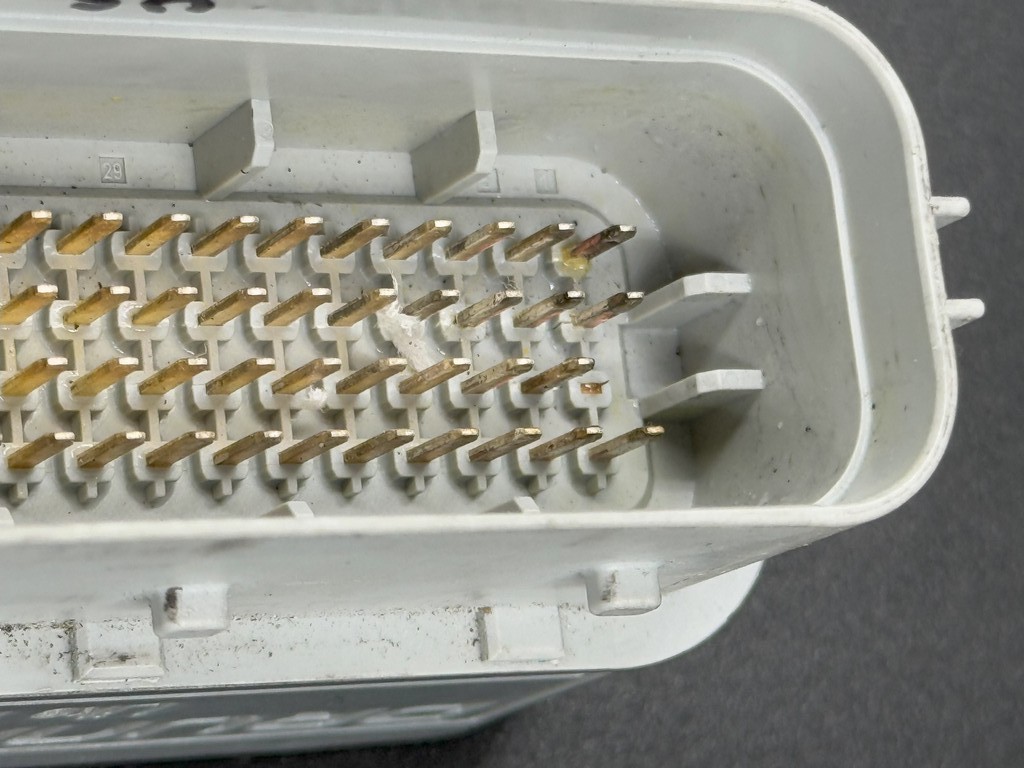
(Figure 2)
4.1.3. Damage to the wiring. Connecting to the wrong connector or damage to the vehicle’s wiring.
4.1.4. Corrosion of connections. Oxidation resulting from the using of damaged connectors (see Figure 3).
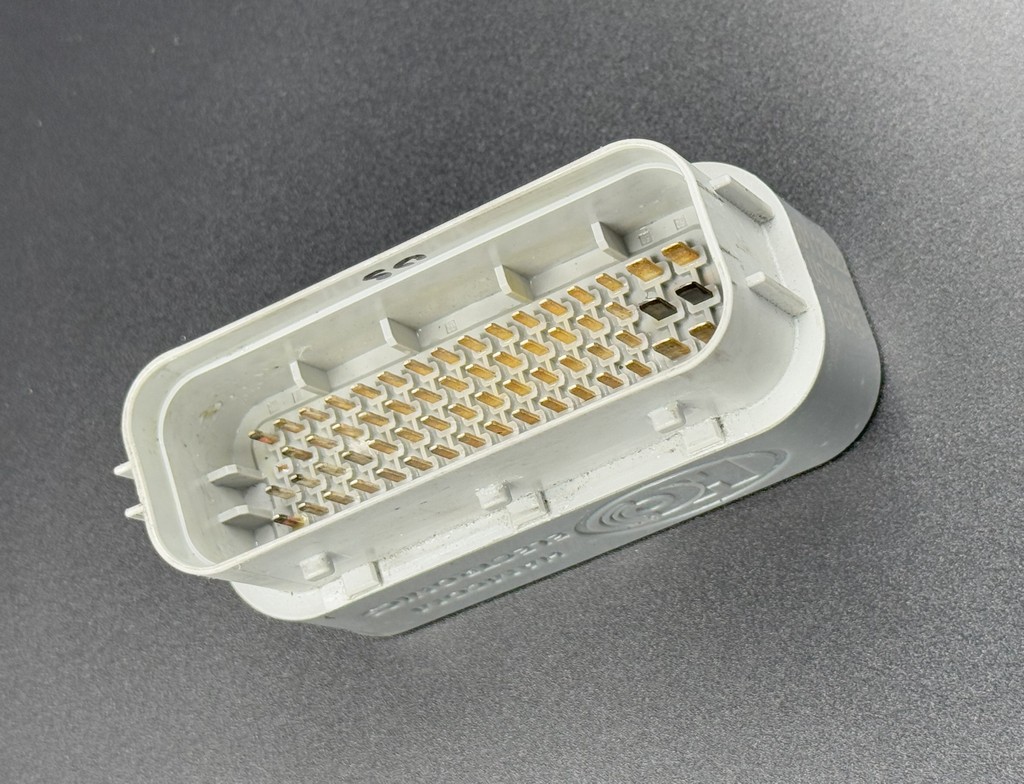
(Figure 3)
4.1.5. Extreme operating conditions. The device was used in conditions not specified in the product’s specifications (e.g., under high voltage or in an aggressive environment).
4.2. Intentional Actions That Void the Warranty:
4.2.1. Attempts to disassemble the device (see Figure 4).
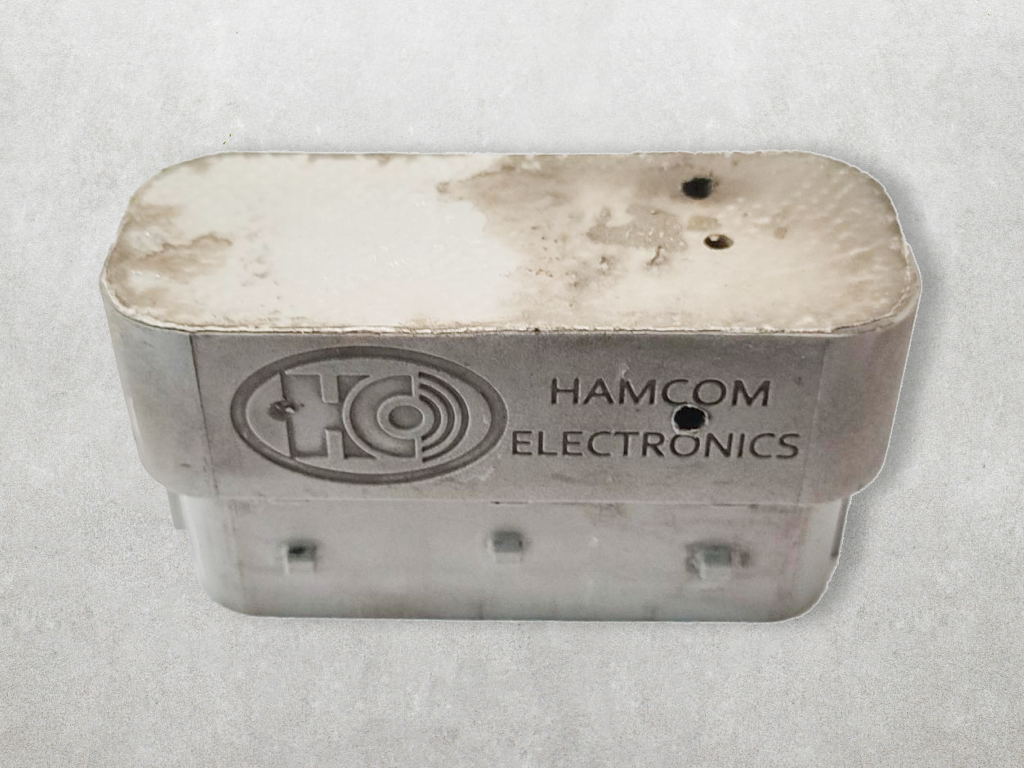
(Figure 4)
4.2.2. Reverse engineering and copyright violations will result in the blocking of the user account.
4.2.3. Removal of serial numbers, stickers, or trademarks, as well as modification of the device’s appearance or branding (see Figure 5, 6).
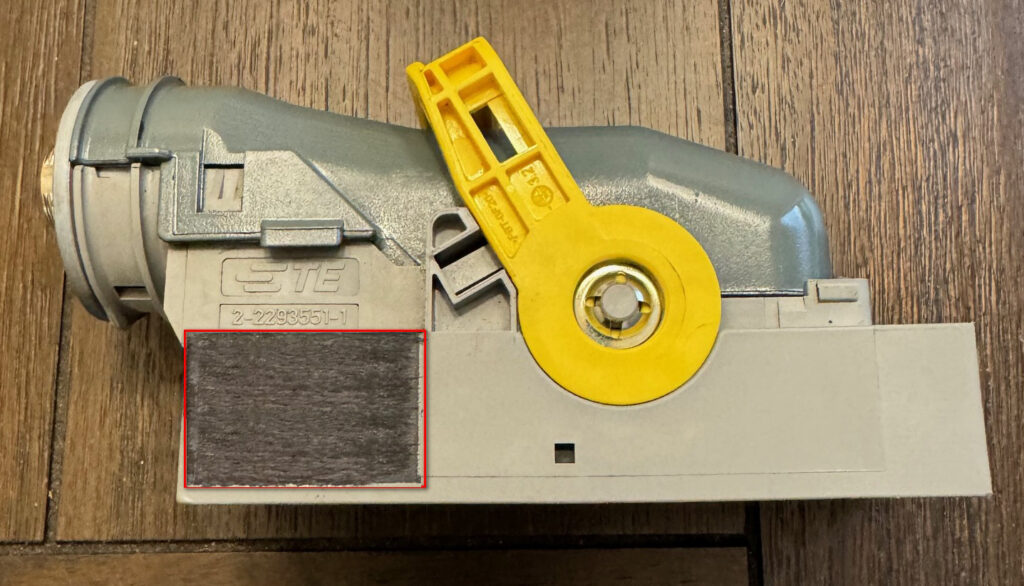
(Figure 5)
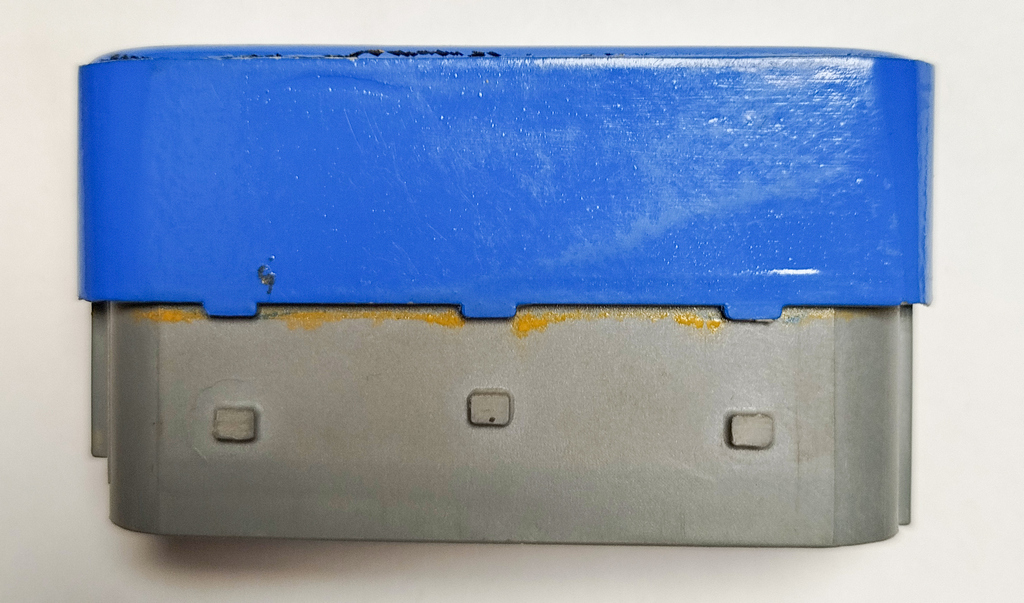
(Figure 6)
4.2.4. A stolen device is not eligible for servicing, unlocking, or warranty replacement. Purchasing a device from third parties is risky; if you proceed, check the device on the verification page (Section 2) or contact DrunkLab support.
5. Warranty Replacement Approval Process
5.1. To submit a warranty claim, the following information must be provided:
5.1.1. The device’s serial/order number is indicated on the casing (see Figure 7).
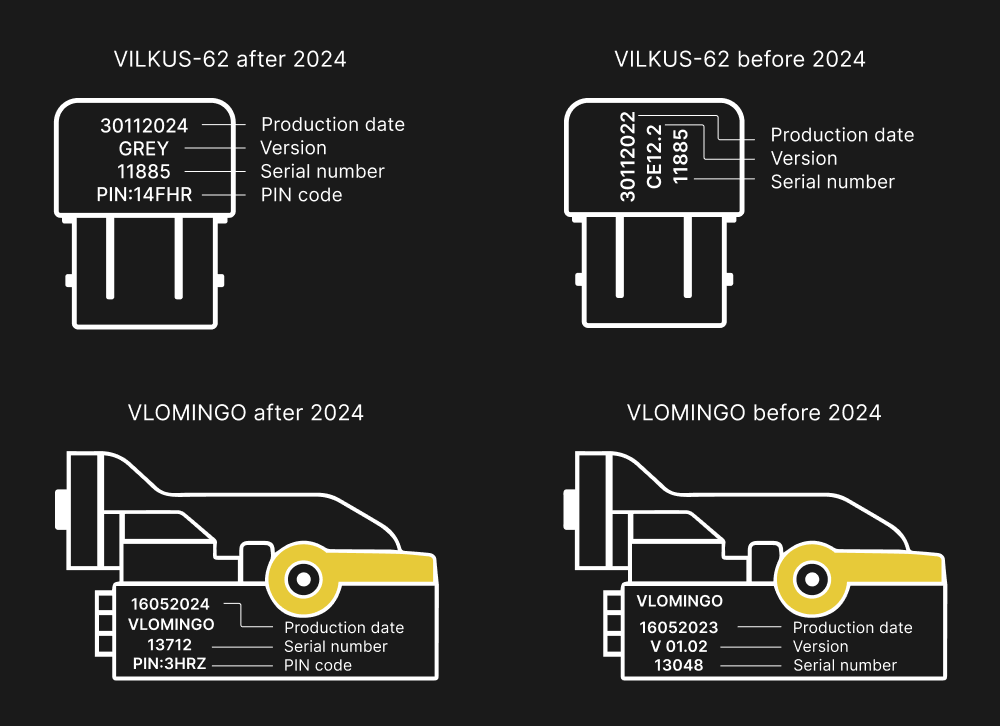
(Figure 7)
5.1.2. Diagnostic results of the device via the Mochester App (M4 App).
5.1.3. Photos of the device showing all sides, including top, back, and connector pins. Make sure to show that the device is unbroken.
5.1.4. A copy of the receipt for sending the faulty device, showing the tracking number, recipient’s address, declared value, and weight of the package.
5.2. Connecting the Device via Mochester 4 App:
First, the device must be connected through the Mochester App (for the VILKUS-62, this applies to trucks, construction equipment, and buses with the emulator installed). Our specialists must clear errors in your vehicle’s control units and update the device firmware.
5.3. Photo or Video Materials for Device Condition Verification:
If the clearing errors and updating the firmware doesn’t fix the problem, or if the Mochester 4 App diagnostics reveal a malfunction, our support team will request the photo or video evidence that confirms that the device’s condition meets the requirements outlined by the manufacturer.
5.4. Device Replacement:
If, after confirming with the user the return of the faulty device (per section 5.1.4), the device’s condition is acceptable, a DrunkLab staff member will initiate the shipment of a new device to the user to replace the faulty one.
5.5. Important Conditions in Case of Missing Required Materials:
5.5.1. If any of the required materials (sections 5.1, 5.2, 5.3) are missing when submitting a warranty claim, DrunkLab staff will need to check the device at their workplace. This may delay the warranty decision, and the user will receive a final response or replacement only several weeks after the device has been sent to DrunkLab (after the faulty device is delivered and inspected by engineers).
5.5.2. If the user cannot provide proof of purchasing the device from DrunkLab Store (dl.ge), i.e., in cases where the device was purchased from third parties, the user must provide ALL materials: serial number, connection to the Mochester 4 App, and photo/video documentation. We need to confirm that the device was not stolen. If the user is not the original purchaser from the DrunkLab Store, refusal to complete any remote device verification steps will result in denial of warranty service for the device.
5.6. Why the Replacement Procedure May Be Delayed: Examples of Situations with Missing Materials
5.6.1. If the user does not provide access to the device via the Mochester 4 App, DrunkLab staff will not be able to verify the cause of the malfunction and whether the malfunction exists. In this case, warranty replacement will only be processed after the device has been inspected at DrunkLab’s office. If the malfunction is not confirmed during the lab inspection, the device will be returned to the user with the corresponding order without a replacement.
5.6.2. If the user does not provide photo or video evidence of the device’s condition, the staff can not assess its appearance and condition in advance. The device will await inspection at DrunkLab’s office, and a replacement unit will not be sent until the inspection is completed.
5.6.3. Without a tracking number from the user pertaining to the package with the faulty devices, DrunkLab staff cannot confirm that the device is en route for evaluation.
6. Paid Service and Extended Warranty
DrunkLab does not provide paid service or repairs for cases not covered by the warranty or extended warranty services.
7. Warranty Device Return Procedure
7.1. Prepare the Package:
Use suitable materials to shield device from the damage while you securely pack it for the shipping.
7.2. Complete Customs Declaration
Get a CN22 or CN23 customs declaration form from the post office or complete it online. Provide complete and accurate information about the items, including their description, quantity, value, and reason for return.
- Reason: warranty return
- Price: $15 per item or less (do not exceed $100 per package).
Note: The defective device has a low declared value, a mandatory condition for proper customs processing!
7.3. Choose a Postal Service and Delivery Option:
Select a convenient delivery service (e.g., FedEx) that provides shipping from the USA to Georgia (a country, not a state in the USA!).
7.4. Fill Out the Recipient’s Address:
Provide the precise mailing address of the legal entity in Georgia:
HamCom Electronics LLC
Angisa 55
Batumi, ZIP Code: 6000
Georgia (country, not US state)
+995 591 662141
7.5. Pay for Delivery:
You can pay for the package’s delivery services by selecting a convenient payment method (e.g., credit card, PayPal, etc.).
7.6. Ship the Package:
Present the package and completed customs declaration form at the chosen post office or use online shipping services if available. Obtain a receipt or confirmation of shipment and retain it for tracking purposes.
7.7. Track the Shipment:
To speed up the process, please send the tracking number and photo of the customs declaration to our email ([email protected]) for shipment tracking.
Feel free to reach out to DrunkLab support if you have any questions.