





We have programmed your truck before, but then somebody has programmed your ECM with OEM software so you got a non-warranty case? Here's the discounted solution!
We can restore your software from our database for just a half of original price!
Main features:- 20 minutes or less.
- All hardware and software versions supported.
- No TechTool is required.
Legal framework usage of this service
The service may require other additional hardware and/or software tools on the Customer side. See “Equipment requirements” section for the details.
Terms and conditions are determined in the Public Offer Agreement. Full agreement text is located at the Agreement page of this website.
The software (Mochester 4 app) and all its components are DrunkLab LLC\'s intellectual property. Copyright violations will be prosecuted.
How-To
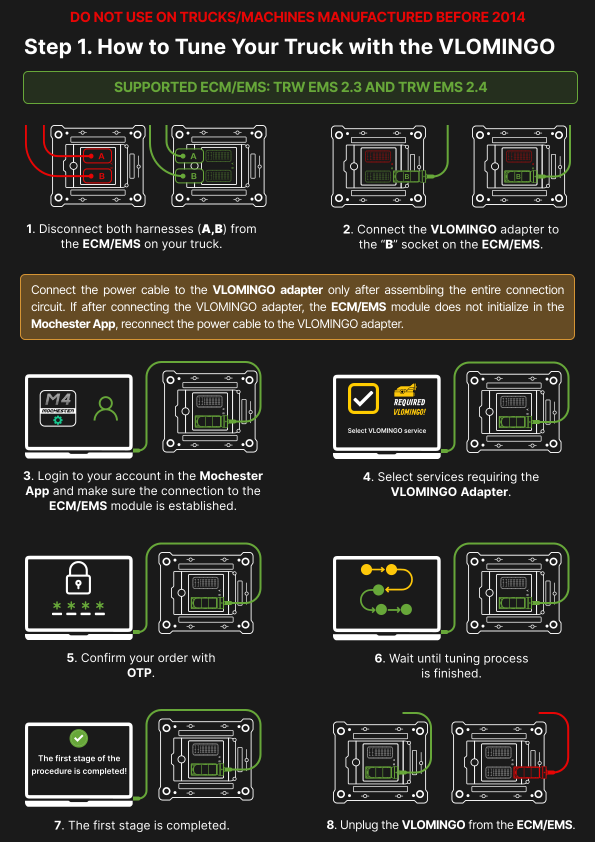
This service is available using VLOMINGO Tuning Adapter only.
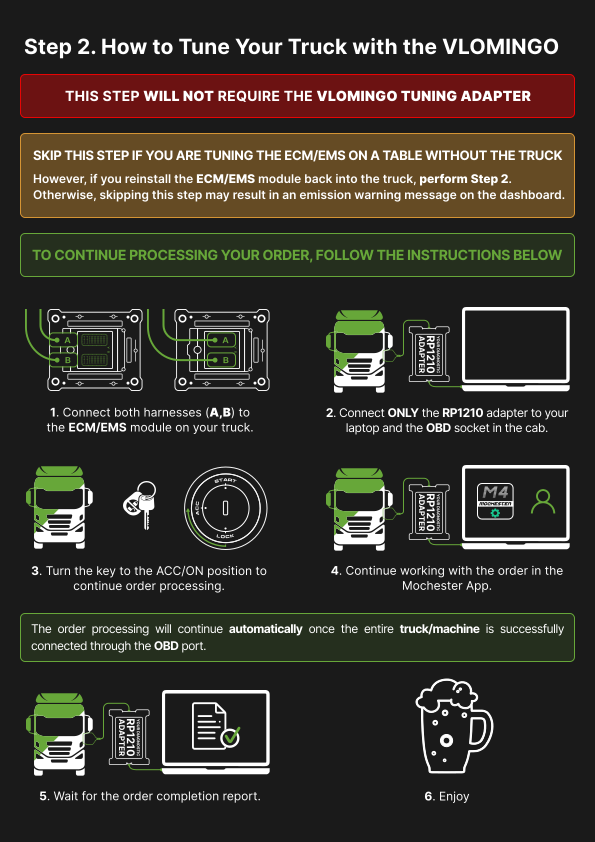
Purchase and wait for delivery of VLOMINGO before start. Here you can find a detailed guide on the VLOMINGO Adapter connection and truck tuning.
- Log in your shop account. Not registered yet? Time to do it now.
- Make sure your store wallet balance is more than $425.00.
- Download the Mochester 4 App and install it.
- Run the Mochester 4 App.
- Use your shop credentials to log in (yes, from this shop).
- Follow the instructions of the wizard.
Equipment requirements
- VLOMINGO Tuning Adapter from HamCom Electronics (available in DrunkLab Store only).
- Laptop/PC/VM with Windows Vista, 7, 8, 10, 11.
- Communication adapter: 88890020, VoCom or ANY RP1210C (Nexiq USB-Link, Noregon DLA , DPA5, Inline6, etc).
- Download the Mochester 4 App and install it.
That’s it!
We do not need Tech Tool 2 or other foreign software. We use only self-developed tools for best result.
Warranty terms and conditions
This product is covered by D3LW™ program. D3LW is DrunkLab Limited Lifetime Warranty.
Warranty cases are resolved in priority order. Policy is “fix or return”, that means full refund in case of impossibility to fix the problem immediately.
Warranty cases are:
- Configuration errors.
- ECM memory-related fault codes appear after flashing.
- Aftertreatment system fault codes (not including instrument cluster reagent level code).
Non-warranty cases are:
- ECU replacement (different ECU serial numbers detected than stored into database during reprogramming).
- Software update campaign performed (different software detected).
- ACM connection after programming.
- Cracking/readout attempts detected (different fingerprint is stored into ECU).
Only logged in customers who have purchased this product may leave a review.
Reviews
There are no reviews yet.